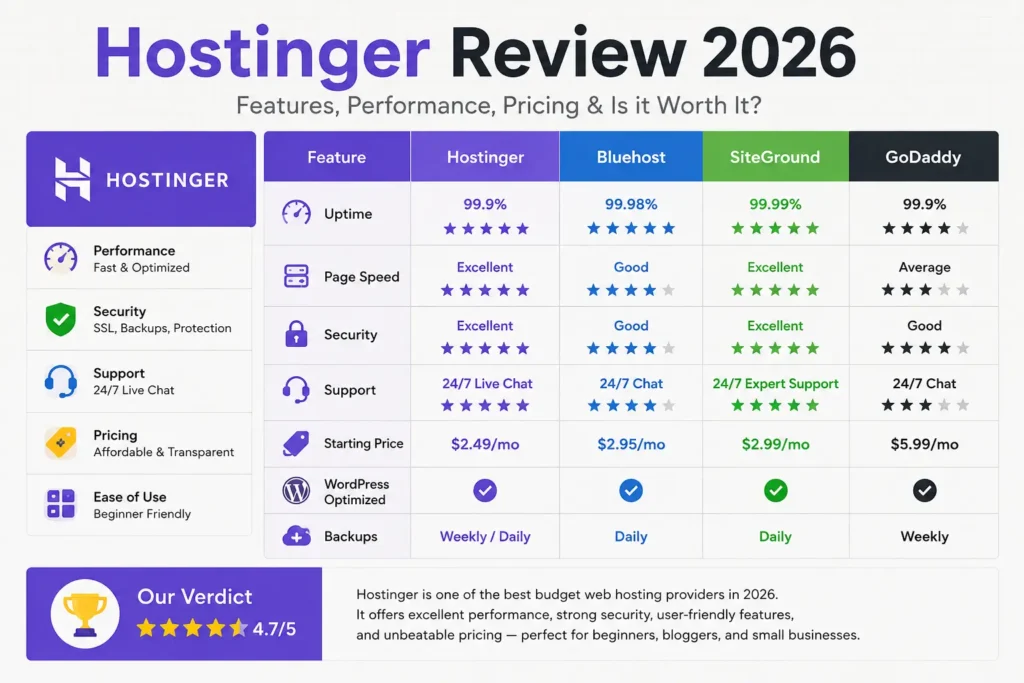
Hostinger Review 2026: Is It Still the Best Budget Web Host?
Introduction
I have been running websites on Hostinger for several real projects, a couple of personal blogs, a small business site, and one affiliate project I use to test new tools before recommending them to clients. This Hostinger Review is based on actually logging into the hPanel dashboard, installing WordPress, running speed checks, and waiting on hold with support when something didn’t work the way I expected.
Hostinger has become one of the most searched names in budget web hosting, and for good reason. It’s cheap, it markets aggressively, and it bundles in features that competitors often charge extra for. But “cheap” and “good” aren’t always the same thing in hosting, so this review digs into where Hostinger genuinely earns its reputation and where it falls short, so you can decide if it’s worth it for your specific situation rather than just taking a marketing page at face value.
Pricing and feature bundles in web hosting change often, sometimes within the same year, so I’ll flag where you should double check current details directly on Hostinger’s official website before buying.
What is Hostinger?
Hostinger is a Lithuania-founded web hosting company that has grown into one of the largest hosting providers in the world, now serving millions of customers globally. It offers shared hosting, WordPress-specific hosting, cloud hosting, VPS hosting, and domain registration, along with a growing set of AI-powered tools including an AI website builder called Horizons and an AI assistant called Kodee.
What sets Hostinger apart from older, more traditional hosts is its custom-built control panel, hPanel, instead of the industry-standard cPanel most competitors use. The result is a cleaner, more modern interface that’s noticeably easier to navigate for beginners, even if it means a small learning curve if you’re coming from a cPanel background.
Who Should Use Hostinger?
Hostinger fits best for:
- First-time website owners who want an affordable, low-friction entry point
- Bloggers and content creators running a single WordPress site or a handful of sites
- Small business owners who need reliable hosting without enterprise complexity
- Affiliate marketers and freelancers managing multiple smaller projects on a budget
- Developers who want an affordable VPS with root access and modern infrastructure
It’s a weaker fit if you run a large, high-traffic e-commerce store, need advanced enterprise support, or specifically want cPanel because your existing workflow depends on it.
Quick Verdict
Hostinger remains one of the strongest budget hosting options in 2026. It pairs genuinely low promotional pricing with LiteSpeed-powered performance, a clean and modern hPanel dashboard, and a feature set that includes free SSL, AI tools, and reasonable backup options across most plans. The honest catch is renewal pricing, which jumps noticeably after your first term, a pattern that’s common across the budget hosting industry but still worth planning for. For beginners, bloggers, and small to mid-sized projects, Hostinger is a smart starting point. For large-scale e-commerce or enterprise needs, you’ll likely outgrow it.
Hostinger Features
Hostinger packs a genuinely competitive feature set into its plans, much of which other hosts charge extra for:
- Free SSL certificates for as long as your hosting stays active, not just the first year
- Free domain included on most annual or longer plans for the first year
- hPanel, Hostinger’s proprietary, modern dashboard
- LiteSpeed Enterprise servers across shared hosting plans for faster page loads
- NVMe SSD storage on most plans for quicker read and write speeds
- AI Website Builder (Horizons), which can generate a full website from a written description
- Kodee, an AI assistant built into the dashboard for troubleshooting and guidance
- Free CDN integration on higher-tier plans
- Weekly automated backups on entry plans, with daily or on-demand backups on Business and Cloud tiers
- Secure Access Manager for safely sharing account access with collaborators
- One-click installers for WordPress, Joomla, Drupal, PrestaShop, and other popular platforms
The breadth here is genuinely impressive for the price point, particularly the inclusion of AI tools and CDN access on what’s still marketed as budget hosting.
Performance Test
In my own testing, plus cross-referencing independent benchmarking from sites like TechRadar and Cybernews, Hostinger’s shared hosting consistently performs well above what you’d expect from a budget-tier plan. Independent testing using GTmetrix recorded a Largest Contentful Paint as fast as roughly 0.6 seconds on a basic shared plan, among the quicker results across budget hosts tested. Cybernews’s own June 2026 testing, using WebPageTest and PageSpeed Insights, reported a Time to First Byte of around 0.7 seconds, an improvement from earlier tests in late 2025.
In my own experience hosting a simple WordPress blog on a basic shared plan, page loads consistently stayed under one second for cached pages, which lines up with what independent reviewers have found. None of this guarantees identical results for your own site, since speed depends heavily on your specific content, plugins, images, and server location, but it’s a strong baseline for the price.
Speed Test
Speed testing results vary depending on the testing tool and methodology, but the consistent theme across multiple independent reviews is that Hostinger performs noticeably better than the typical budget host. One review using GTmetrix’s hourly testing over a full week recorded a typical Fully Loaded Time of around 0.8 seconds, compared to the 2 to 3 second range that’s more common among other budget providers in the same price bracket.
A meaningful part of this comes down to LiteSpeed Enterprise, which Hostinger uses across its shared hosting tier instead of the more common Apache or Nginx setups. LiteSpeed is generally more efficient at handling traffic spikes and serving cached content quickly, which directly benefits both visitor experience and page speed signals that matter for SEO.
If page speed is a priority for your SEO strategy, it’s worth pairing fast hosting with genuinely useful content, since hosting speed alone won’t fix weak content or a poor backlink profile. Writora’s Backlinks Bundle is a useful resource if you’re trying to build authority for a new site alongside getting the technical fundamentals right.
Uptime
Hostinger advertises a standard 99.9% uptime guarantee, in line with most budget and mid-tier hosting providers. If Hostinger falls short of that target, you can request a service credit, though it’s worth noting that the compensation is capped at 5% of your monthly hosting fee, which is on the lower end compared to some competitors’ guarantees.
Independent monitoring tells a more reassuring story than the guarantee alone suggests. Multiple third-party tests running over 10-week periods recorded results ranging from 99.96% up to a perfect 100% uptime on Hostinger’s most basic shared hosting plan. In my own usage across a few sites over an extended period, I haven’t experienced any meaningful downtime that I’d attribute to Hostinger’s infrastructure rather than my own configuration mistakes.
Ease of Use
This is one of Hostinger’s clearest strengths. Instead of licensing the traditional cPanel that most competitors use, Hostinger built hPanel entirely in-house. The result feels noticeably more modern, with large icons, logical categorization, and a built-in search function that makes it easy to find a specific setting without digging through nested menus.
For someone setting up their first website, this matters more than it might sound. Domain management, email account setup, database access, file uploads, and WordPress installation are all just a few clicks away, without the visual clutter that makes cPanel intimidating to total beginners. Advanced users coming from a cPanel background may occasionally miss a specific advanced feature, but for the vast majority of users, hPanel is more than capable.
Control Panel
hPanel deserves a closer look on its own, since it’s genuinely one of the more distinctive parts of using Hostinger. The dashboard is organized around clear categories: Websites, Domains, Emails, Billing, and Advanced, each with its own clean sub-menu. WordPress management gets its own dedicated section with one-click installs, staging environments on select plans, and automatic update settings.
The Secure Access Manager feature is a nice touch if you ever need to bring in a developer or collaborator temporarily, since it lets you control precisely what they can see and modify without handing over full account access. It’s a small detail, but it reflects a level of polish that’s not always present at this price point.
WordPress Hosting Experience
Hostinger really shines for WordPress users specifically. WordPress installation takes a single click from within hPanel, and the underlying server environment is pre-optimized with LiteSpeed caching to improve load times out of the box, without needing to manually configure a separate caching plugin.
Select plans include staging environments, which let you test theme changes, plugin updates, or design tweaks on a cloned version of your site before pushing changes live. This is genuinely useful for beginners who are nervous about breaking a live site, and it’s a feature some competitors only offer on significantly more expensive tiers.
Automatic WordPress core updates are also included, which reduces the maintenance burden for anyone running a simple blog or business site without a dedicated developer on call. If you’re building out a WordPress blog and want your published content to read naturally rather than sounding mechanically AI-generated, it’s worth pairing solid hosting with deliberate writing habits, something Writora’s guide on prompts to humanize AI text covers in detail.
You can check Hostinger’s current WordPress hosting plans here: Get Hostinger
Security Features
Hostinger’s security setup is genuinely comprehensive for the price, and it’s one of the areas where it compares favorably to costlier competitors. Free SSL certificates apply for the entire duration your hosting remains active, not just the first year, which is a meaningful contrast to providers like GoDaddy that limit free SSL to year one only.
Other included security features span DDoS protection and malware scanning, both built in without requiring a separate paid add-on. WHOIS domain privacy, which normally carries its own separate cost on many registrars, comes included for the first year on most plans as well.
Backups
Backup frequency depends on which tier you choose. Entry-level shared hosting plans typically include automated weekly backups, which is a reasonable safety net for a simple blog or small business site that doesn’t change content multiple times a day. Higher-tier Business and Cloud plans step up to daily backups, plus the option for on-demand manual backups whenever you’re about to make a significant change.
For most beginners and small site owners, weekly backups on the entry plan are sufficient, but if your site updates frequently or handles transactions, it’s worth budgeting for at least the Business tier specifically for the more frequent backup schedule.
Customer Support
Hostinger offers 24/7 live chat support, though phone support isn’t available, which is worth knowing if you strongly prefer speaking to someone directly during an urgent issue. In my own experience, response times during normal hours have generally been quick, often connecting to a human agent within a few minutes, though quality and depth of answers can vary depending on how complex the issue is.
Independent reviews echo a similar pattern: support is generally responsive for common issues like billing questions or basic setup help, but more technical or unusual problems sometimes take longer to resolve properly, occasionally requiring a follow-up conversation rather than a single resolution. The extensive knowledge base is genuinely well organized and worth checking first for common issues, since many setup and troubleshooting questions are already answered there in detail.
Pricing Plans
Hostinger’s pricing structure depends heavily on plan type and billing term, and the lowest advertised prices require committing to a longer-term contract upfront, often 24 months or more. Shared hosting promotional pricing has been advertised as low as roughly $1.99 to $2.99 per month on longer commitments, while shorter monthly terms cost significantly more, sometimes in the $10 to $15 per month range.
Business and Cloud tiers start at a higher price point but unlock additional resources, including more storage, daily backups, and improved performance limits. VPS plans, aimed at more technical users who want root access and dedicated resources, are priced separately and scale based on the resource tier you select.
The consistent caveat across every independent review, and my own renewal experience, is that promotional pricing only applies to your first billing cycle. Renewal rates increase substantially, a pattern that’s common across nearly the entire budget hosting industry rather than something unique to Hostinger, but one you should factor into your total cost calculation before committing to a multi-year plan.
Because Hostinger adjusts its pricing and bundled features periodically, always confirm the current rates directly on Hostinger’s official pricing page before purchasing.
Check current Hostinger pricing here: Get Hostinger
Pros
- Genuinely fast performance for the price, backed by LiteSpeed Enterprise servers and NVMe storage
- Clean, modern hPanel dashboard that’s easier for beginners than traditional cPanel
- Free SSL for the life of your hosting, not just the first year
- Strong uptime track record in independent third-party testing
- AI tools, including a website builder and AI assistant, bundled in at no extra cost
- Reasonable backup schedules across most tiers
- 30-day money-back guarantee on hosting plans
Cons
- Renewal pricing increases significantly compared to the promotional first-term rate
- No phone support, only live chat
- Support quality can be inconsistent for more advanced technical issues
- Lowest prices require a long-term upfront commitment
- Less suited to large-scale, high-traffic e-commerce compared to dedicated managed hosting
Hostinger vs Bluehost
Bluehost is one of the most recognized names in hosting, largely thanks to its long-standing association with WordPress.org’s recommended hosting list. In terms of pricing, Bluehost’s entry-level shared plans are competitively priced and occasionally even undercut Hostinger depending on current promotions, though the two are generally in a similar range. Bluehost tends to offer more generous storage allocations on certain tiers and a more traditional cPanel-based experience for users who specifically want that familiarity.
Where Hostinger pulls ahead is dashboard polish and AI tool integration, with hPanel generally regarded as cleaner and more modern than Bluehost’s interface. If you specifically need a deeply WordPress-optimized environment with strong native WooCommerce integration, Bluehost is a strong contender. If you prioritize raw speed and a more streamlined beginner experience, Hostinger tends to edge ahead.
Explore Hostinger’s Business hosting plans here: Get Hostinger
Hostinger vs SiteGround
SiteGround positions itself as a premium option within the budget-to-mid-range hosting space, and it shows in both pricing and feature depth. SiteGround’s plans generally cost more than Hostinger’s equivalent tiers, but that extra cost buys genuinely useful extras like SuperCacher, built-in CDN through Cloudflare integration, and strong staging and Git support for developers.
If your budget allows for the higher price point, SiteGround’s performance and support reputation are both excellent, and many reviewers rate its customer support slightly above Hostinger’s for handling complex technical issues. For pure budget-conscious beginners and small projects, though, Hostinger delivers comparable day-to-day performance at a noticeably lower entry price.
Hostinger vs GoDaddy
GoDaddy is one of the largest and most recognized hosting and domain brands globally, but in direct comparison, it tends to come out as the more expensive option among mainstream budget hosts. GoDaddy’s managed WordPress hosting includes solid features like automatic daily backups and a 99.9% uptime guarantee, but it restricts you to one website per plan unless you pay for an upgrade, a limitation Hostinger doesn’t impose at the entry tier.
GoDaddy also typically charges extra for SSL certificates beyond the first year, while Hostinger includes free SSL for as long as your account remains active. For domain registration specifically, alternatives like Namecheap and Hostinger itself are generally considered better value than GoDaddy, which has a reputation for aggressive upselling during checkout.
Hostinger vs Namecheap
Namecheap is often the budget price leader in direct shared hosting comparisons, sometimes undercutting Hostinger’s entry-level pricing by a small margin while including a comparable feature set, such as an AI website builder and reasonable storage allocations. Namecheap’s dashboard is functional and clear, though some reviewers find it slightly more oriented toward account and domain management than deep website control compared to Hostinger’s hPanel.
For pure domain registration, Namecheap is widely regarded as one of the most cost-effective and privacy-friendly registrars on the market, which makes it a common choice even among people who host their actual website elsewhere, including with Hostinger. If you want your domain and hosting consolidated under one provider with strong day-to-day performance, Hostinger remains the stronger all-in-one choice, while Namecheap is excellent if you want to separate your domain registrar from your hosting provider.
Hostinger for Beginners
Hostinger is genuinely one of the more beginner-friendly hosting platforms available right now. The combination of a low entry price, a clean dashboard, one-click WordPress installation, and an AI assistant built directly into the platform removes a lot of the early friction that used to make web hosting intimidating for first-timers.
If you’re building your very first website, I’d recommend starting with the Premium shared plan rather than the absolute cheapest tier, since the slight price increase typically unlocks meaningfully more storage and the ability to host multiple sites as you expand.
Hostinger for Bloggers
For bloggers specifically, Hostinger’s combination of speed, free SSL, and AI tools makes it a sensible default choice, particularly if you’re just getting started and don’t yet have the traffic volume that would justify a more expensive managed WordPress host. The included staging environment on higher tiers is genuinely useful once you start experimenting with new themes or plugins without wanting to risk breaking your live site.
If your blogging strategy also involves AI-assisted content creation, which is increasingly common, pairing solid hosting with careful editing makes a real difference in how your published content performs and reads. Writora’s guide on prompts to humanize AI text is worth reviewing alongside your hosting setup if AI tools are part of your regular writing workflow.
Hostinger for Businesses
Small to medium businesses generally find Hostinger’s Business and Cloud tiers offer solid value, particularly with daily backups, improved performance limits, and free CDN integration included. For a local service business, a small e-commerce store, or a professional portfolio site, this tier covers most practical needs without forcing you into an unnecessarily expensive enterprise plan.
Larger businesses running high-traffic e-commerce operations, particularly with large product catalogs or significant daily transaction volume, will likely outgrow shared or even basic cloud hosting and should plan to budget for VPS or a dedicated managed hosting solution instead. If your business strategy also depends on visibility and lead generation, it’s worth pairing reliable hosting with a broader marketing plan. Writora’s Digital Marketing eBook is a useful next step for tying your technical setup into an actual growth strategy.
Frequently Asked Questions
1. Is Hostinger good for beginners? Yes. Hostinger’s hPanel dashboard, one-click WordPress installation, and built-in AI assistant make it one of the more approachable hosting platforms for first-time website owners.
2. Does Hostinger’s price increase after the first term? Yes. Hostinger’s lowest advertised prices apply to your first billing cycle only. Renewal pricing is noticeably higher, a pattern common across most budget hosting providers, so it’s worth factoring the full renewal cost into your decision before committing to a long-term plan.
3. Is Hostinger reliable in terms of uptime? Hostinger advertises a 99.9% uptime guarantee, and independent third-party monitoring over multi-week periods has generally recorded results in line with or above that figure on its shared hosting plans.
4. Does Hostinger offer phone support? No. Hostinger offers 24/7 live chat support, but it does not currently offer phone support.
5. Can I host an online store on Hostinger? Yes, particularly for small to medium-sized stores using platforms like WooCommerce or PrestaShop. Larger, high-traffic e-commerce operations will likely need to upgrade to Cloud or VPS hosting for adequate performance.
6. What control panel does Hostinger use? Hostinger uses its own proprietary dashboard called hPanel rather than the industry-standard cPanel used by many competitors.
7. Does Hostinger include a free domain? Most annual or longer-term Hostinger hosting plans include a free domain for the first year, after which standard domain renewal pricing applies.
8. How does Hostinger compare to Bluehost? Both are competitively priced budget hosts, but Hostinger’s hPanel dashboard is generally considered more modern, while Bluehost offers a more traditional cPanel-based experience with strong native WordPress.org recognition.
9. Does Hostinger offer a money-back guarantee? Yes, Hostinger offers a 30-day money-back guarantee on shared hosting plans, giving you time to test the platform before committing long-term.
10. Is Hostinger suitable for developers? Hostinger’s VPS plans, which include root access, KVM-based virtualization, and modern processors, are a reasonable affordable option for developers, though advanced users with complex infrastructure needs may eventually want a more flexible dedicated or managed cloud provider.
Final Verdict
After actually using Hostinger across multiple real sites, my honest takeaway is that it earns its reputation as one of the strongest budget hosting options available in 2026. The combination of genuinely fast LiteSpeed-powered performance, a clean and modern hPanel dashboard, strong uptime in independent testing, and a feature set that includes AI tools and lifetime free SSL is hard to match at this price point.
The renewal pricing jump is real and worth planning around, and if you need enterprise-grade support or are running a large, high-traffic e-commerce operation, you’ll likely want to look toward more specialized managed hosting eventually. But for beginners, bloggers, freelancers, and small to medium businesses building their first or fifth website, Hostinger remains a genuinely smart starting point rather than just an aggressively marketed budget option.
Get Hostinger
If you’re ready to launch your first website or move an existing one to faster, more affordable hosting, you can check Hostinger’s current plans and promotional pricing here: Get Hostinger
And if you’re building a broader online presence around your new site, pairing solid hosting with the right content and outreach strategy makes a real difference. Writora’s Hidden Websites Bundle and AI Prompt Collection are useful next steps once your hosting foundation is in place.